AI creative tools sell a one-step promise. Drop a product photo into an app and it comes back rendered across a dozen environments. Type a detailed prompt and a finished editorial image appears. For a marketing team whose client just cut the photo shoot budget, that promise is hard to resist, and figuring out which tools actually deliver has become part of the creative job.
The output of the one-step approach has a name: AI slop. It carries the same smooth, symmetrical look no matter whose brand is on it, because it is what the model defaults to when nobody steers.
Good AI creative exists, and it comes out of a process with far more steps than the tools advertise. The difference between slop and good work is that process.
What AI slop looks like
AI slop looks the same everywhere it shows up: perfect symmetry, generic fonts, flawless skin, and a smoothness that reads as artificial. These traits are what image models default to, and getting away from them means actively steering the tool against its own instincts.
The pattern is now familiar enough to work in reverse. Level’s creative team has watched a brand post a stock photo of a real person and get accused of using AI in the comments, and entire Reddit communities exist to call out AI-generated content in commercial work. When real photography or illustration gets flagged as fake, polish itself has become a liability.
The real process behind one AI-generated image
One of Level’s creatives built this demonstration using a mock Level product, a soft drink that does not exist. The assumption being tested: to create a polished editorial image, you write one detailed prompt, put it into an image model, and take the output.
The exact prompt they used:
“Ethereal editorial portrait on a misty beach, pale light and soft horizon, blonde woman in iridescent pink ruffled garment and bonnet, translucent textures. She is sipping from a black LEVEL can, pressed against a black horse.”
That is a well-written prompt. It names the mood, the light, the wardrobe, the product, and the composition. The image it generates is still slop: a porcelain, doll-like face with airbrushed skin, hair that sits like a styled wig, a backdrop that reads as painted rather than photographed, and a can whose smaller label text blurs into gibberish. The model delivered every noun in the prompt and none of the humanity, because photorealistic imperfection is the one thing it will never volunteer.
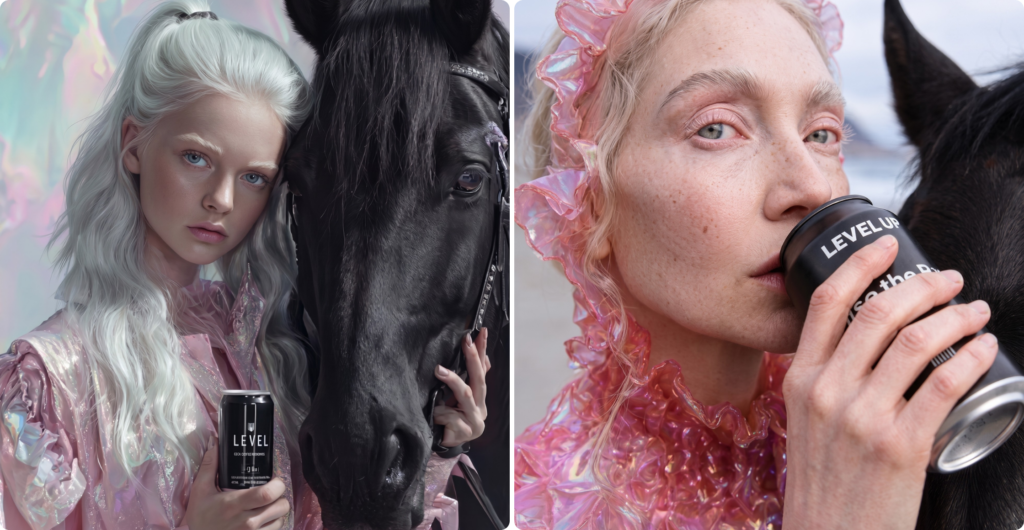
The finished image started from the same idea and took eight steps, the first two spent entirely on the product before any scene existed.
- Write a dedicated product prompt. A NanoGPT prompt rendered the can on its own first, so the label, typography, and proportions were locked before it entered a scene. Image models mangle product labels when asked to invent them inside a larger composition, which is exactly what happened in the one-prompt version.
- Refine the can as a 3D render. 3D rendering tools gave the can accurate shadowing and lighting, the physical believability a flat mockup lacks.
- Moodboard in Midjourney. Wide exploration of the scene itself: the beach, the light, the wardrobe, the horse. Dozens of directions, most of them discarded on sight.
- Select the strongest base image. One frame worth building on. The model generates the options; a person chooses, and that choice is the first place taste enters the process.
- Composite the can into the shot. Custom prompt language placed the rendered product into the subject’s hand without distorting either, with additional realism passes in Krea.
- Upscale in Magnific.ai. The refinement steps that follow need resolution to work with.
- Finish in a typical design tool like InDesign or Photoshop. The skin got its freckles, pores, and asymmetry back, because the model strips them by default. The symmetry got broken on purpose. This is the step that separates the finished image from the default output already crowding every feed.
- Deliver the final high-resolution output.
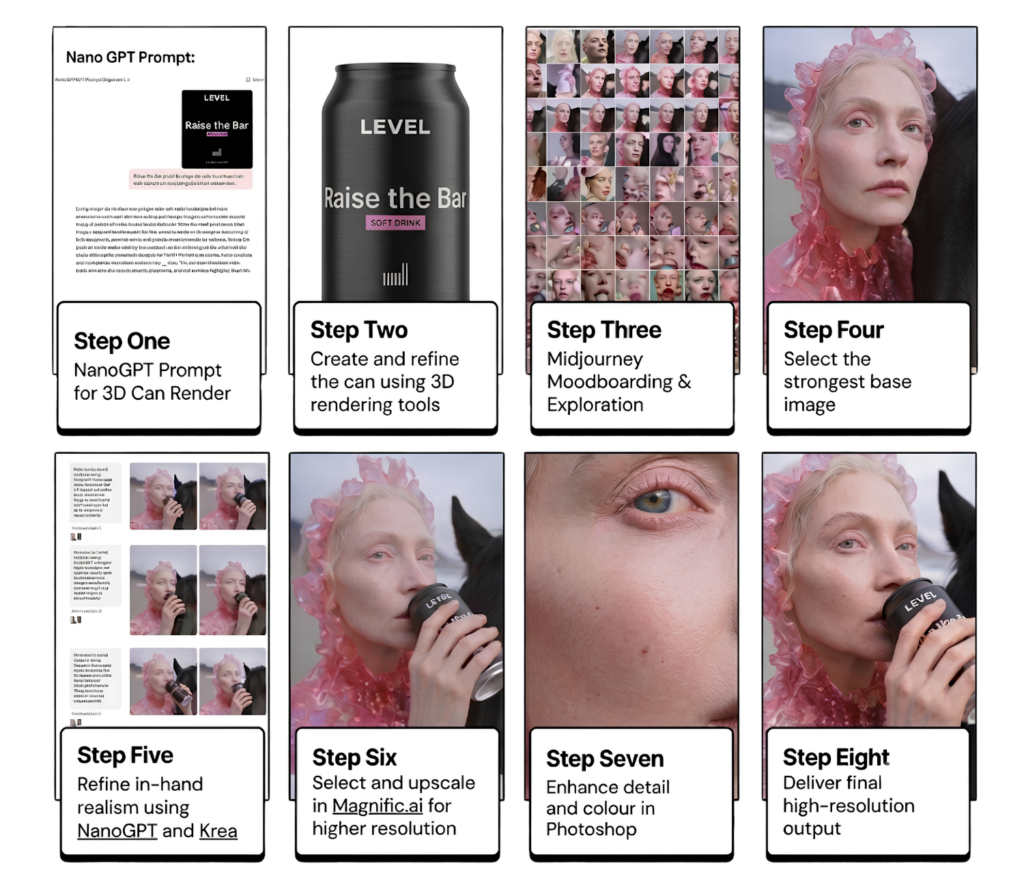
No single tool covers that chain. The team combines the strengths of several together into a process none of them can run alone, and the process changes with every brand because every brand carries different restrictions. One constant holds across all of it: we never use AI to render real people for client work.
How to evaluate AI-generated creative
Most AI conversations measure speed: how much time was saved, how much output got produced. Those gains are real, but they are the wrong test for creative. Before any AI-assisted work ships, our team asks:
- Is this the highest quality result we can get?
- Is it better than standard stock?
- Does it feel curated to the brand?
- Is it emotive? Does it tell a story?
- Is AI adding value here, or just speed?
If the honest answer to the last question is speed, the work is not done.
Why human curation decides AI creative quality
With AI, the real work is curation: the tools generate endlessly, and judgment decides what deserves to exist. That judgment cannot be bottled.
Encoding taste into a system doesn’t work either. Feed a model every brand guideline, every round of feedback history, every piece of prior creative, and hand it the final 10 percent of a piece anyway, and it still drifts back toward the generic. It can only draw on what it was given. The judgment call that keeps a piece specific to one brand instead of every brand has to stay with a person.
Good AI creative is possible. It just isn’t easy. The strongest work gets human judgment at every step, from the first product prompt to the final pass.
Watch the full process in our on-demand session
Level’s creative leaders recently walked through the process behind AI creative that actually holds up, and the taste calls that separate it from slop. The virtual session is available now on demand. Watch the replay and let us know if your team is wrestling with any similar creative questions.