Whether to use AI in creative work is a settled question for most of the industry: 83% of ad executives say their company has used AI in the creative process, up from 60% in 2024, according to the Interactive Advertising Bureau. The open question is where it belongs in the process.
Ipsos and Syracuse University’s Newhouse School tested 20 ads, half human-created and half AI-generated, with 3,000 US consumers and found that human-made ads outperformed their AI counterparts on emotional engagement and short-term sales impact. But adoption is outpacing results, because many companies are using AI at the wrong stage of the process. AI in the creative process adds the most value early, during concepting and production prep, and does the most damage when it takes over the finish.
Level’s creative team has spent the past year testing this on live client campaigns. Here’s the workflow they run, and where it breaks.
Where AI belongs in the creative process
AI belongs in the early and middle stages of the work: research, concepting, exploration, and production prep. Final creative decisions stay with humans, because the model mirrors the quality of direction it’s given.
Level’s creative team has tested this repeatedly. Give a model a thin prompt or let it make the last creative decisions, and the output drifts toward generic, the recognizable AI look. Give the same model detailed direction, brand standards, and feedback history, and it can produce work indistinguishable from a human’s.
A model can only reproduce what it was trained on. Originality, and quality, comes from the person directing it.
The AI creative workflow Level’s team uses
Here’s a common use case: a product gets a packaging redesign, and the brand’s entire lifestyle photo library still shows the old pack. The job is updating every image to the new packaging without a reshoot, while keeping the talent and scenes intact.
Every image in a job like this moves through the same four stages, and a finished image typically takes a few hours. Here’s how Level’s team runs it.
Step 1: Structure the prompt around what cannot change
Before describing what you want the model to do, define what it must leave alone. In the packaging update, that means the talent (every pose, expression, and posture stays identical) and the scene around them (the lighting and setting cannot shift).
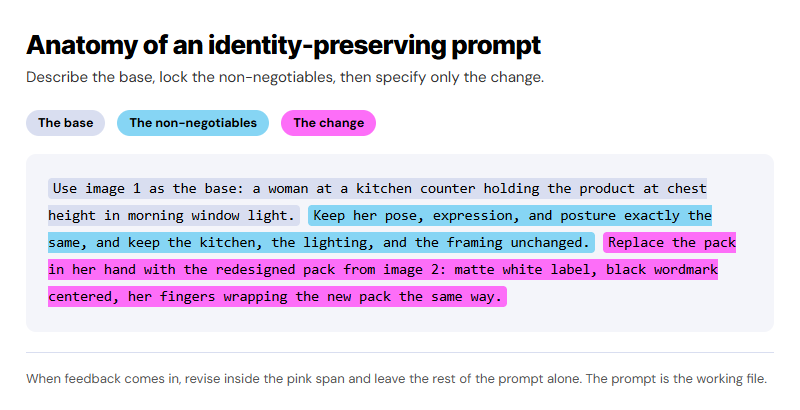
The prompt itself follows a repeatable structure. Describe the base image in plain language. State the things that should not change explicitly, so the model has no ambiguity about what must stay untouched. Then describe the change in concrete detail, down to the new label’s colors, its typography placement, and how the talent’s fingers wrap the pack. Detail is what keeps the model from guessing. The more specific the prompt, the less it improvises.
Treat the prompt as a working file. When feedback comes in on AI-assisted work, write the revision back into the prompt (new product details, adjusted proportions, corrected textures) while the core concept stays fixed. Budget revision rounds for prompt work the same way you would for design time.
Step 2: Generate wide, then select
The first output rarely produces the frame worth building on. Generate dozens of near-identical images, adjusting small variables each round: lighting, perspective, product scale, how the label catches the light. The model can’t judge its own output; a person has to pick the best one.
Step 3: Test more than one model against the task
No single AI tool is right for every part of a job. Different models are trained for different strengths, and the differences show up fast when you put them side by side on the same brief. Run the same task through several tools before committing to one.
In Level’s testing, this step has mattered most whenever a job asks a model to do more than a still image: adding motion, extending a scene, or generating something the base model wasn’t built for. That’s where the gap between tools shows up widest. Some preserve product and brand detail. Others distort it.
When none of the options clear the bar for a given job, scale back the ambition on purpose. A simpler, well-executed static image often looks better to a viewer than an ambitious output that falls short, and it takes a fraction of the effort.
Step 4: Finish every image by hand in a typical design tool like Illustrator or Photoshop
Have a person review and polish every AI-assisted image. Rebuild the small details the model misses (a missing shadow on a neck reads as fake even when nothing else does), and restore any label or logo that was distorted.
Compare the new version against the original, piece by piece, to confirm nothing outside the intended change moved. Color correction and finishing overlays come last. In the packaging update, that means matching the grade across every image so the refreshed library reads as one continuous shoot instead of separate composites.
How to use AI before production starts
The most valuable uses of AI at Level happen before any asset exists.
- Concept mockups that sell an idea. When a concept needs client approval before budget exists, an AI-generated mockup of the finished state gets it over the line. Level’s designers regularly build the “after” image because the idea cannot be sold on the “before” alone.
- Storyboards at near-photographic quality. Video concepts can now be visualized frame by frame before a shoot is scheduled. In Level’s experience, a concept the client can see clears approval faster than one they have to imagine, and a year ago this level of pre-shoot accuracy did not exist.
- Raw footage review. Level used Claude to review, categorize, and label raw shoot footage, work that previously consumed 10 to 20 hours of an editor scrubbing files to find keyframes. Editors now start on the actual edit instead of the file search.
Put the time these use cases save back into the creative work. If a project allotted seven hours for footage review and editing, move the saved time into the edit itself: color, pacing, or sound design.
Where AI in the creative process breaks down
The same tools fail predictably when they move to the end of the process. Generating an ad with finished copy and pushing it into market skips the quality checks that make an ad actually work. AI voiceover shows the same pattern: monotone synthetic narration modeled on the TikTok voiceover style undercuts otherwise strong work, and our team regularly sees polished ads where the voice track alone gives it away.
Product category matters, too. A surreal generated visual fits a fragrance ad because audiences expect abstraction. Higher education and financial services run on trust, and an obviously fake person in an enrollment ad undermines the trust the ad is trying to build. Regulators are starting to respond to this, too. New York now requires a conspicuous disclosure (a visible label telling viewers AI was used) when advertisements include AI-generated synthetic performers, with penalties starting at $1,000 per violation.
Watch the replay of our Creative + AI Virtual Insider Session
Level’s creative leaders recently hosted a live session on where AI belongs in the creative process, where it does damage, and which vendor claims survive contact with real client work. It runs 30 minutes plus a 15-minute live Q&A. Watch the session replay and reach out if you have any questions.